
Qmanager
- Productivity
- 2.20.1.1103
- 57.97M
- Android 5.1 or later
- Nov 14,2021
- Package Name: com.qnap.qmanager
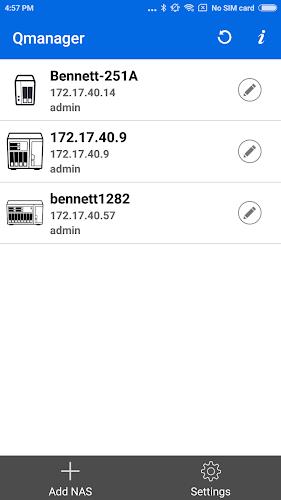
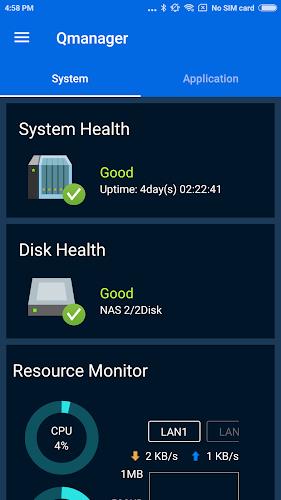
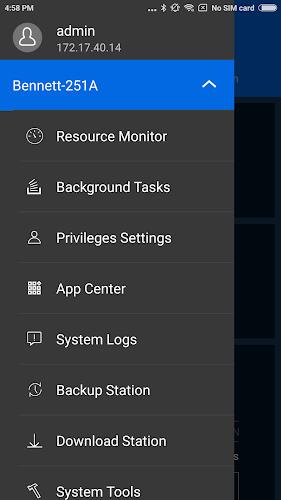
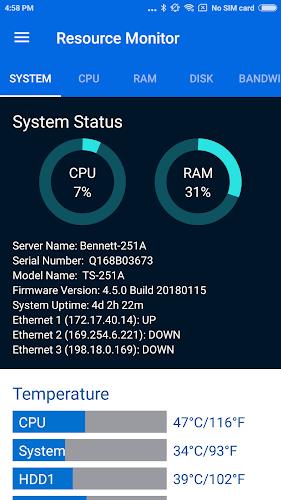
Manage and monitor your QNAP TurboNAS effortlessly with the free Qmanager app for Android devices. With easy-to-understand system information such as CPU and memory usage, as well as system events and online users, you can stay updated on the status of your NAS. Additionally, you can manage your download and backup tasks remotely, pause or run tasks, and even turn on/off application services with a simple click. Ensure the security of your NAS with the ability to check connection status and prevent invasion. Other convenient features include remote restart or shutdown, finding your NAS with the "Beep" sound, and Wake-on-LAN (only supported on Local Network). Download Qmanager now.
Features of this app:
- Monitor system information: With Qmanager, users can easily monitor the system information of their QNAP TurboNAS. This includes CPU usage, memory usage, system event information, and online user status. This feature allows users to keep track of their NAS performance and ensure that everything is running smoothly.
- Check download and backup tasks: Qmanager allows users to check the status of their download and backup tasks. They can also manage these tasks remotely, pausing or running them as needed. This feature provides convenient control over file transfers and ensures that important data is backed up effectively.
- Turn on/off application services: Qmanager offers the ability to control application services with just one click. Users can easily turn on or off services as needed, providing flexibility and efficiency in managing their TurboNAS.
- Check connection status and prevent invasion: Users can check the connection status of their TurboNAS and view the current online users. This helps to prevent unauthorized access and ensure the security of the system.
- Remote restart or shutdown: Qmanager allows users to remotely restart or shutdown their TurboNAS. This feature is particularly useful in situations where physical access to the device is not possible.
- Find MyNAS feature: Qmanager includes a "Find MyNAS" feature that allows users to locate their NAS by triggering a "Beep" sound. This feature is helpful in case the NAS is misplaced or lost within the local network.
In conclusion, Qmanager is a versatile app for Android devices that provides users with the ability to monitor and manage their QNAP TurboNAS remotely. With features like system monitoring, task management, application service control, and remote restart/shutdown, it offers convenience and flexibility in managing the NAS. Additionally, the Find MyNAS feature enhances security by helping users locate their NAS within the local network. Overall, Qmanager is an essential tool for QNAP TurboNAS users who want to easily control and maintain their systems from their mobile devices.
-
Notally - Minimalist Notes

-
Aladdin ALM

-
LSM Webcast Subscription

-
Super Proxy Pro - Secure VPN

-
Learn Italian - 50 languages

-
Learn Excel Formulas Functions

-
Navan

-
The Holy Quran and its Meaning

-
GarageBand Music studio Clue

-
Google Keep - Notes and Lists
-
Vroom: Early Learning

-
Speak English Pronunciation

-
M-KOPA Sales

-
Video Downloader for Pinterest

-
 Amazon is Selling Premium Pokémon Plushies for Just $20 Today
Massive Pokémon plush excitement returns with major price drops on premium collectibles at both Walmart and Amazon.Both retailers have quietly introduced new discounts on the wildly popular 24-inch premium Pokémon plush line, with prices slashed as l
Oct 20,2026 -
Marvel Rivals' First Ever PvE Mode Is Based on the Marvel Zombies Disney+ Show
Marvel Rivals launches its inaugural PvE experience on October 23, 2025, drawing inspiration from the Marvel Zombies Disney+ series."The city is ablaze, the infected are surging — and it's your mission to stand firm," the developers hinted. "Get an
Oct 18,2026 - ◇ Reverse: 1999 Is Celebrating Its Second Anniversary with Paradise Regained Oct 16,2026
- ◇ Avowed Editions: Contents Compared Oct 11,2026
- ◇ Machinarium Free on Epic Games Store This Week Oct 11,2026
- ◇ Iron Roads is a board game-style train management sim out now on iOS Oct 09,2026
- ◇ EA Sports FC Mobile brings home the holidays with new Festive Fixtures takeover Oct 07,2026
- ◇ Off-limits action, or a hint to making nine of this puzzle’s answers match their clues Crossword Clue - Try Hard Guides Oct 07,2026
- ◇ Squishmallows Enters Match-Three Gaming Genre Oct 05,2026
- ◇ Bloodlines 2 DLC Cancelled, Adds Content into Base Game After Backlash Oct 05,2026
- ◇ ALLfiring redeem codes and how to use them (May 2026) Oct 04,2026
- ◇ Helldivers 2 Festival of Reckoning Adds Snowball Fights & Stratagems Oct 02,2026




- 1 All the Buttons on Fisch Can Be Found Here Dec 24,2024
- 2 Three Nights at the Blacksite Pressure Guide [April Fools] May 12,2025
- 3 Roblox: Eat Pizza to Grow GIGACHAD Codes (January 2025) Feb 25,2025
- 4 Hogwarts Mystery Character Guide - All Romance Options Explained Apr 07,2025
- 5 Roblox Forsaken Characters Tier List 2025 Feb 14,2025
- 6 Top Pirate Crew Formations: Like a Dragon: Hawaii Mar 13,2025
- 7 Marvel Rivals' Controversial Hitbox System Draws Attention Feb 11,2025
- 8 Marvel Contest of Champions Champion Cards Guide Mar 14,2025





-
Mastering the Art of Digital Tools
A total of 10
-
Best News & Magazines Apps for Daily Reading
A total of 10
-
Hidden Gems: Unexpectedly Useful Other Apps
A total of 10











