

ES File Decrypter
- Tools
- v0.0.1
- 1.60M
- by Sumit Chahal
- Android 5.1 or later
- Aug 12,2026
- Package Name: com.sumitchahal.esfiledecrypter
ES File Decrypter is a dedicated application that helps you unlock files previously encrypted with ES File Explorer. This tool is especially valuable if you've lost or forgotten your encryption password and need to regain access to your files. ES File Decrypter allows you to recover your encrypted content quickly and efficiently, entirely without using the original password.
Understanding ES File Decrypter
Managing encrypted files can be tricky in the digital age, particularly when passwords are lost. ES File Decrypter offers a practical solution by letting you decrypt files encrypted by ES File Explorer—no original password needed. This guide explores how the app works, how to use it, its core features, interface design, benefits, and limitations.
One standout advantage is that ES File Decrypter is completely free, making it easily accessible for anyone facing file encryption issues. Its interface is simple and user-centric, allowing smooth decryption even for non-technical users.
How to Use ES File Decrypter
The app is straightforward to operate. Follow these steps to decrypt your files:
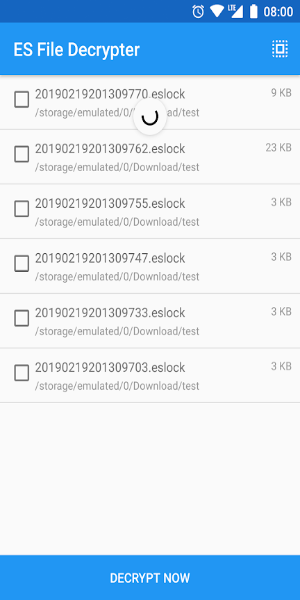
Launch the App: Open ES File Decrypter to see a clean, intuitive interface designed for easy navigation.
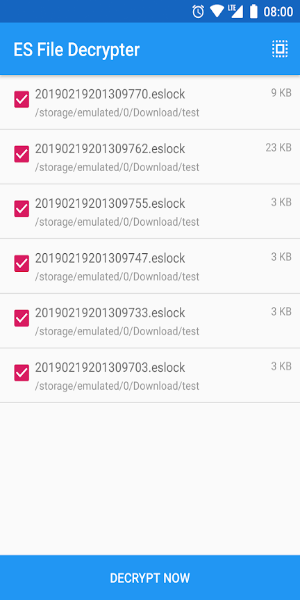
Select Encrypted Files: Tap to choose the encrypted file(s) you want to decrypt. You’ll be guided through your device storage to locate the file.
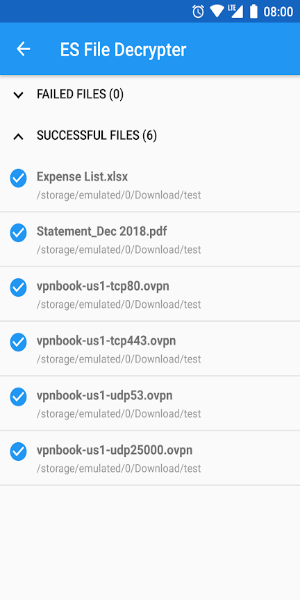
Start Decryption: Once you select the file, begin the decryption process. The app works to unlock the file without the password. Time required depends on file size and complexity.
Access Decrypted Files: Once decryption is complete, you can save the decrypted file to a chosen location or open it directly in the app.
Batch Decryption: For multiple encrypted files, use batch processing to decrypt several files at once.
Key Features of ES File Decrypter
ES File Decrypter includes several useful features that improve its performance and ease of use:
No Password Required: Decrypt files without entering the original encryption password.
Free to Use: The app is completely free, offering a cost-effective solution to file access problems.
Simple Interface: Easy-to-navigate design ensures clarity and simplicity during use.
Batch Processing: Decrypt multiple files simultaneously for better efficiency.
ES File Explorer Compatibility: Works specifically with files encrypted by ES File Explorer.
Privacy and Security: Your data remains private; the app does not store or misuse decrypted content.
Design and Usability
The app is built with user experience in mind. Key aspects include:
Clean Layout: Minimalist design focuses attention on essential functions.
Step-by-Step Guidance: Clear prompts guide users through each stage of decryption.
Fast Performance: Optimized for quick file processing with minimal delays.
Wide Compatibility: Supports various devices and Android versions.
Pros and Cons
Like any software, ES File Decrypter has its strengths and weaknesses:
Pros:
-Password-Free Recovery: Efficiently recovers files without needing the original password.
-Completely Free: No hidden fees or subscription costs.
-Batch Support: Handles multiple files at once, saving time.
-Easy to Use: Clean interface suitable for all user levels.
Cons:
-Limited Compatibility: Only works with files encrypted by ES File Explorer.
-Security Considerations: Always download from trusted sources to avoid risks.
Get ES File Decrypter Now
ES File Decrypter is a helpful tool for accessing encrypted files when passwords are unavailable. It’s free, easy to use, and supports batch decryption for convenience. Although it only works with ES File Explorer-encrypted files and requires careful downloading, its functionality makes it a useful addition to your app collection. Download ES File Decrypter today to restore access to your files and simplify file management.













-
 Pokemon Sleep Launches Good Sleep Day Event
Receive a welcome boost to your Drowsy PowerIncreased encounters with Clefairy, Clefable, and CleffaPokémon Growth Week Vol. 5 is on the horizonSpring is here, but that’s no reason to cut back on cozying up in bed. That’s why Pokémon Sleep is encoura
Sep 26,2026 -
 Endless Grades: Pixel Saga sneaks in some new content in latest update
Unlimited Levels: Pixel Saga has released a surprise updateTwo new pets and the return of the Blossom Haven event take center stageFace off against the Enchanted Bride, increase your heroes' popularity, and claim rewardsOne of the most engaging parts
Sep 26,2026 - ◇ Hideo Kojima 'Already Wrote the Concept' for Death Stranding 3, But Isn't Making It Right Now Sep 25,2026
- ◇ The Outer Worlds 2 News Sep 25,2026
- ◇ Dune: Awakening's Rentable Private Servers Available at Launch — Here's What You Do (And Don't) Get Sep 22,2026
- ◇ Infinity Nikki Version 1.8 Danqing Season Unveils Mythical Art Adventure Sep 22,2026
- ◇ Arc Raiders Dev to End Support of The Finals' PS4 Version to Focus 'Our Support on Current Generation Hardware' Sep 20,2026
- ◇ High on Life 2 Coming to PC, PS5, Xbox & Game Pass Sep 20,2026
- ◇ Xbox Showcase 2025 Reveals 3v3 Fighter Sep 16,2026
- ◇ Disney Solitaire MAC Edition: Essential Guide Sep 15,2026
- ◇ Spirit Empress Debuts in Clash Royale with 4 Events Sep 14,2026
- ◇ Divinity Original Sin 3 Rumors Debunked As Fans Tie TGA Statue to New Logo Sep 13,2026




- 1 All the Buttons on Fisch Can Be Found Here Dec 24,2024
- 2 Hogwarts Mystery Character Guide - All Romance Options Explained Apr 07,2025
- 3 Roblox: Eat Pizza to Grow GIGACHAD Codes (January 2025) Feb 25,2025
- 4 Three Nights at the Blacksite Pressure Guide [April Fools] May 12,2025
- 5 Roblox Forsaken Characters Tier List 2025 Feb 14,2025
- 6 Top Pirate Crew Formations: Like a Dragon: Hawaii Mar 13,2025
- 7 Marvel Rivals' Controversial Hitbox System Draws Attention Feb 11,2025
- 8 Marvel Contest of Champions Champion Cards Guide Mar 14,2025





-
Mastering the Art of Digital Tools
A total of 10
-
Best News & Magazines Apps for Daily Reading
A total of 10
-
Hidden Gems: Unexpectedly Useful Other Apps
A total of 10











