

PhotoShot - Photo Editor
- Photography
- 2.19.9
- 98.06M
- by Vyro AI
- Android 5.0 or later
- Sep 20,2026
- Package Name: com.vyroai.photoeditorone
In today's smartphone era, photography isn't just a hobby—it's an art. With platforms like Instagram driving visual culture, capturing and sharing stunning images is more important than ever. Even great photos can benefit from a final touch to unlock their full potential. That’s where PhotoShot – Photo Editor shines. This versatile app comes packed with features that turn everyday snapshots into extraordinary visual creations.
Amazing Photo Transformation
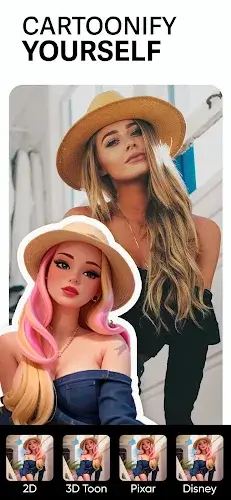
- Cartoonify: One of PhotoShot's standout tools uses AI to cartoonify your photos in one tap. Instantly turn pictures into playful, charming cartoon-style images for a fun twist.
- Sky Changer: A game-changer for landscapes, this tool lets you swap the sky with high-quality background options to easily enhance the mood and atmosphere of your shots.
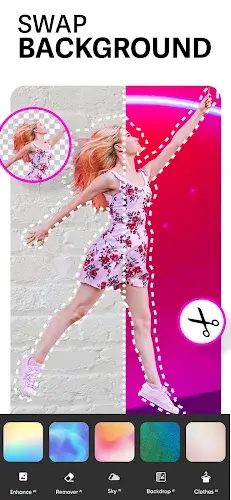
- Background Photo Editor: Simplify background removal and swapping with access to over 100 backgrounds. Give any photo a fresh context in seconds.
- Cutout: AI-powered background removal quickly isolates subjects and creates clean PNGs—ideal for designers or anyone working on creative projects.
- Blender: Blend two images seamlessly to produce artistic creations, whether you're merging photos or crafting sophisticated double exposures.
- Clothes Changer: Experiment with outfit colors using AI—no need to change your actual wardrobe for that perfect look.
Photo Enhancement
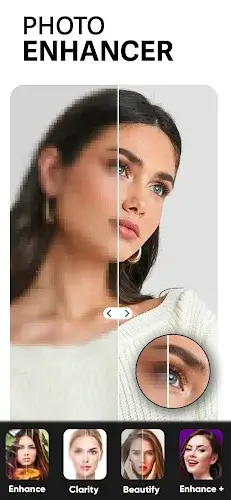
- AI Photo Enhance: Boost image quality with AI enhancement that upscales, sharpens, and reduces noise in low-resolution photos.
- Retouch Selfies: Selfie lovers can beautify their portraits using a variety of filters to smooth skin, brighten eyes, and perfect every detail.
Useful Editing Tools
- Remove: Easily erase unwanted objects like watermarks or logos to keep your photos clean and professional.
- Add Text: Choose from over 100 fonts to add captions, create memes, or design invitations with endless creative options.
- Add Stickers: Customize your pictures with a huge collection of stickers to add personality and fun.
Special Effects
- Effect: Apply eye-catching effects like Neon, Glitch, Drip, and Light fx to give your photos an artistic edge.
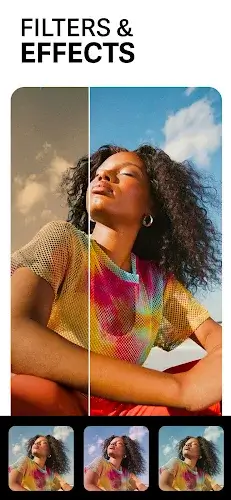
- Filter: Quickly enhance your photo’s mood with hundreds of free filters—from vintage looks to modern aesthetics.
- Blur: Create professional depth-of-field with motion blur and DSLR-style blur effects for stunning, polished images.
Photo Cropping and Resizing
- Crop: Easily rotate, zoom, and resize photos to perfectly frame your subject every time.
- Resize: Optimize images for Instagram by squaring or blurring backgrounds for a standout social feed.
Conclusion
PhotoShot – Photo Editor is your all-in-one solution for photo editing. With powerful tools for transformation, enhancement, effects, and resizing, it provides everything you need to unleash creativity and elevate your photos. Whether you're a professional photographer or a casual shooter, PhotoShot gives you the power to make every image shine. Try it today and see your photos become captivating works of art.
-
Police Suit Camera

-
GetLook Salon at Home Services

-
Bukalapak

-
Photos - Wear OS Image Gallery

-
Wide Camera - Panorama 360 HD

-
MedicalService

-
Nike: Shoes, Apparel & Stories

-
CutastePhotosVideoFrame

-
Whatnot: Live Video Shopping

-
Voila AI Artist Cartoon Photo

-
ALDI SÜD Angebote & Prospekte

-
Manual Camera: DSLR Camera Pro

-
PicFitter
-
Gcam - Google Camera Port
-
Arc Raiders Dev to End Support of The Finals' PS4 Version to Focus 'Our Support on Current Generation Hardware'
Embark Studios — the creative force behind the blockbuster hit Arc Raiders — has announced it will discontinue last-generation support for The Finals next year.Although Season 10 is scheduled to launch as planned across all other platforms on March
Sep 20,2026 -
High on Life 2 Coming to PC, PS5, Xbox & Game Pass
Squanch Games has revealed High on Life 2 during Xbox Games Showcase 2025, confirming a winter release for PC, PlayStation 5, and Xbox Series X/S, including Game Pass availability.Return to the Absurd First-Person Shooter UniverseThe sequel continues
Sep 20,2026 - ◇ Xbox Showcase 2025 Reveals 3v3 Fighter Sep 16,2026
- ◇ Disney Solitaire MAC Edition: Essential Guide Sep 15,2026
- ◇ Spirit Empress Debuts in Clash Royale with 4 Events Sep 14,2026
- ◇ Divinity Original Sin 3 Rumors Debunked As Fans Tie TGA Statue to New Logo Sep 13,2026
- ◇ Cute Auto-Chess Game Claws & Chaos Now Available Sep 11,2026
- ◇ Arknights Mizuki & Caerula Another Tides – Mode Overview, Mechanics, and Gameplay Breakdown Sep 10,2026
- ◇ Pokémon Go unveils the Delightful Days season, which will run throughout the summer Sep 09,2026
- ◇ Ex-Subnautica 2 Leads Accuse Krafton of Blocking Release, Sacking to Dodge Bonus Sep 08,2026
- ◇ Best Buy Has the Lowest Price I've Seen on a QD-OLED Gaming Monitor Sep 08,2026
- ◇ Steve's Lava Chicken: Shortest Song to Hit UK Chart Sep 07,2026




- 1 Roblox: Eat Pizza to Grow GIGACHAD Codes (January 2025) Feb 25,2025
- 2 All the Buttons on Fisch Can Be Found Here Dec 24,2024
- 3 Hogwarts Mystery Character Guide - All Romance Options Explained Apr 07,2025
- 4 Three Nights at the Blacksite Pressure Guide [April Fools] May 12,2025
- 5 Roblox Forsaken Characters Tier List 2025 Feb 14,2025
- 6 Top Pirate Crew Formations: Like a Dragon: Hawaii Mar 13,2025
- 7 Marvel Rivals' Controversial Hitbox System Draws Attention Feb 11,2025
- 8 Marvel Contest of Champions Champion Cards Guide Mar 14,2025





-
Mastering the Art of Digital Tools
A total of 10
-
Best News & Magazines Apps for Daily Reading
A total of 10
-
Hidden Gems: Unexpectedly Useful Other Apps
A total of 10











