

Parental Control FamilyTime
FamilyTime Parental Control App: Your Ultimate Tool for Digital Parenting
FamilyTime Parental Control App
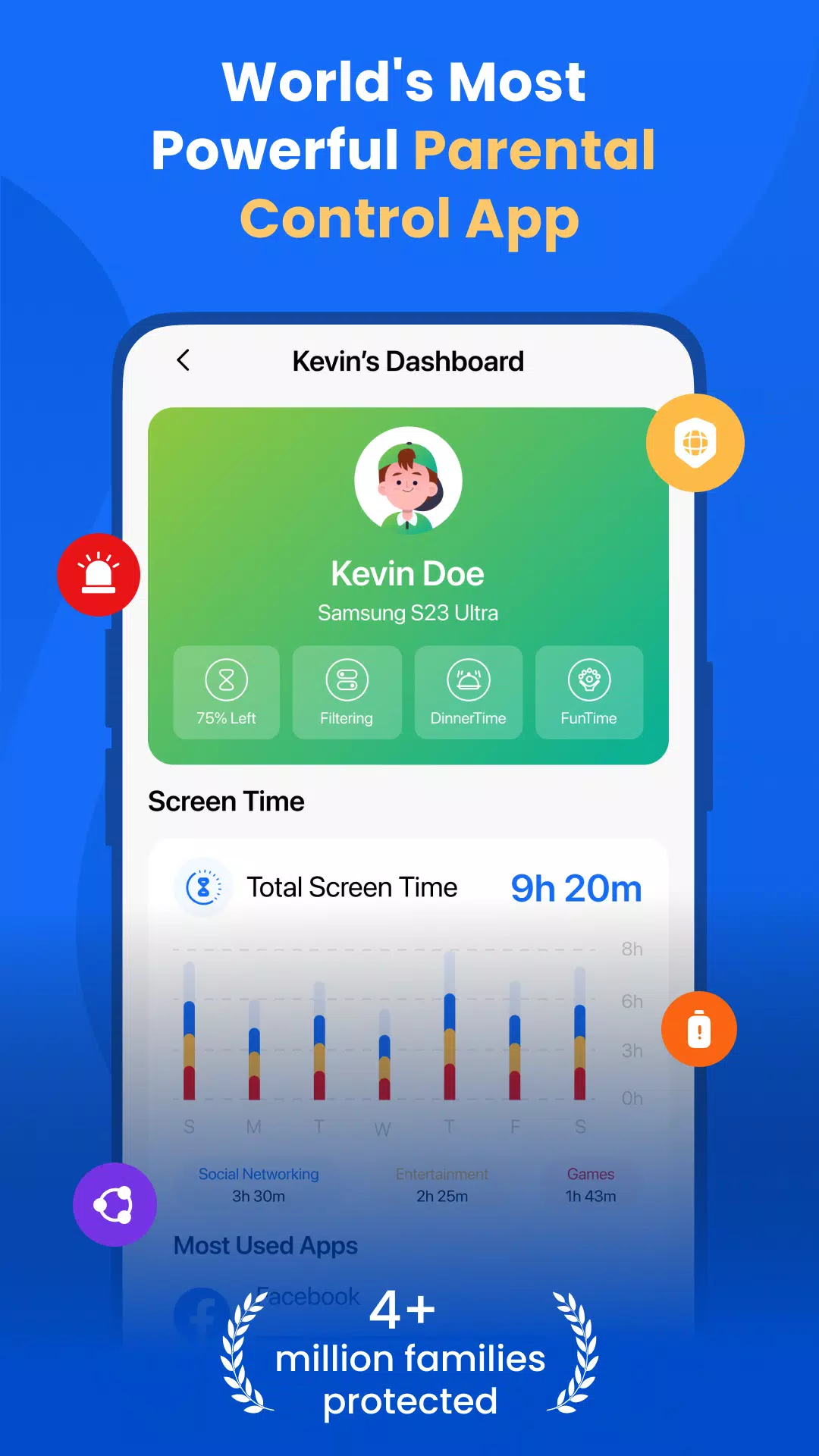
FamilyTime is a comprehensive parental control app designed to help parents manage their child's screen time effectively. By blocking apps and games, FamilyTime ensures your child maintains a healthy balance between digital and real-world activities. With features like location tracking, YouTube and TikTok history monitoring, call and SMS tracking, app usage monitoring, app limits, and family tracking, parents can foster a safe and healthy internet environment for their children.
A Parental Control App
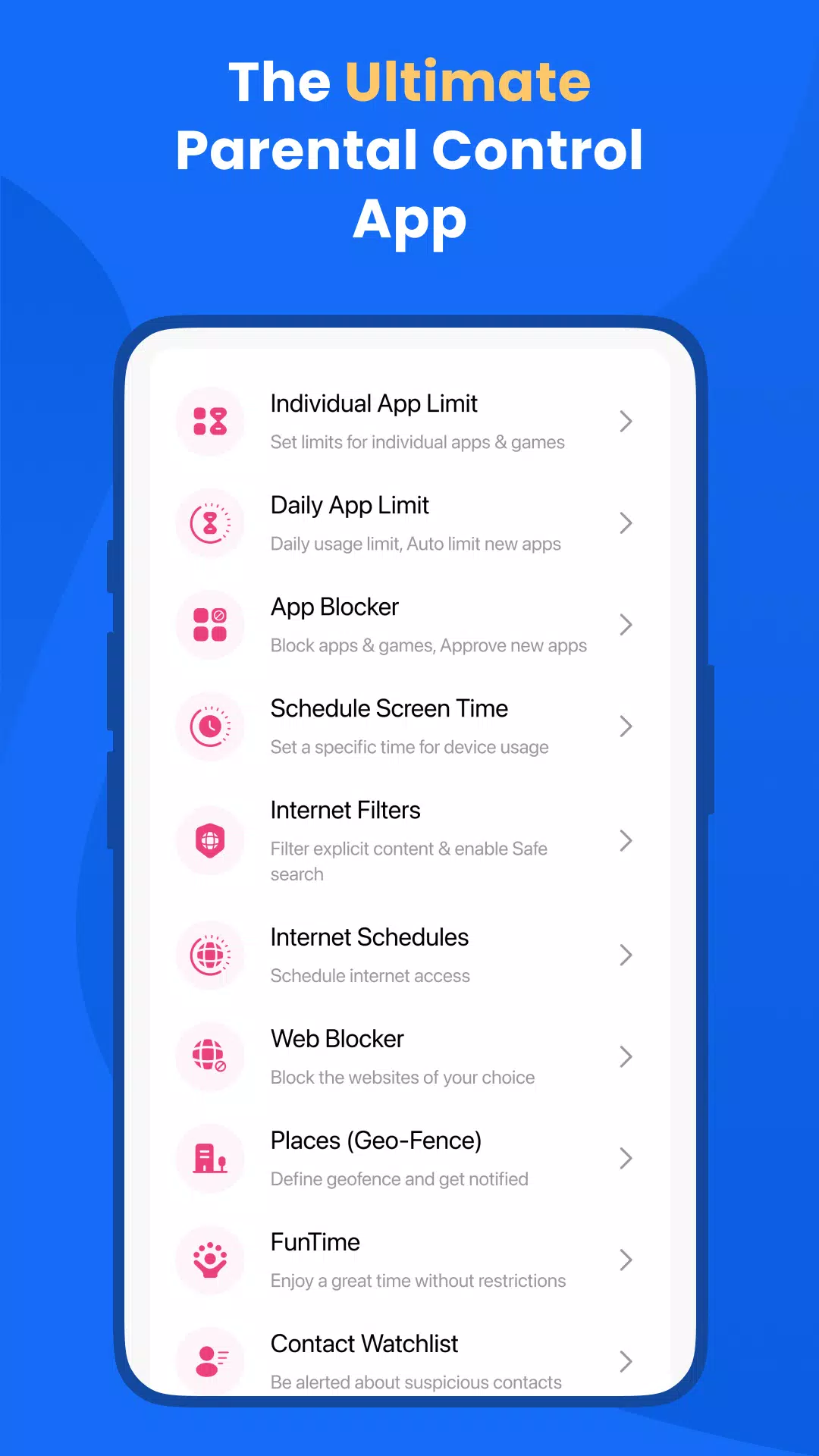
With FamilyTime, you can set daily or hourly device usage limits to encourage a balanced lifestyle. The app allows you to quickly approve or lock apps as needed, ensuring your child's screen time is well-managed.
- Screen Time Schedules: Establish schedules for device access, such as locking phones during Dinner Time, Home Work Time, and Bed Time. Customize these schedules to fit your family's routine.
- Daily App Limits: Set time limits for individual apps and games. Once the limit is reached, the app will block access, promoting responsible usage.
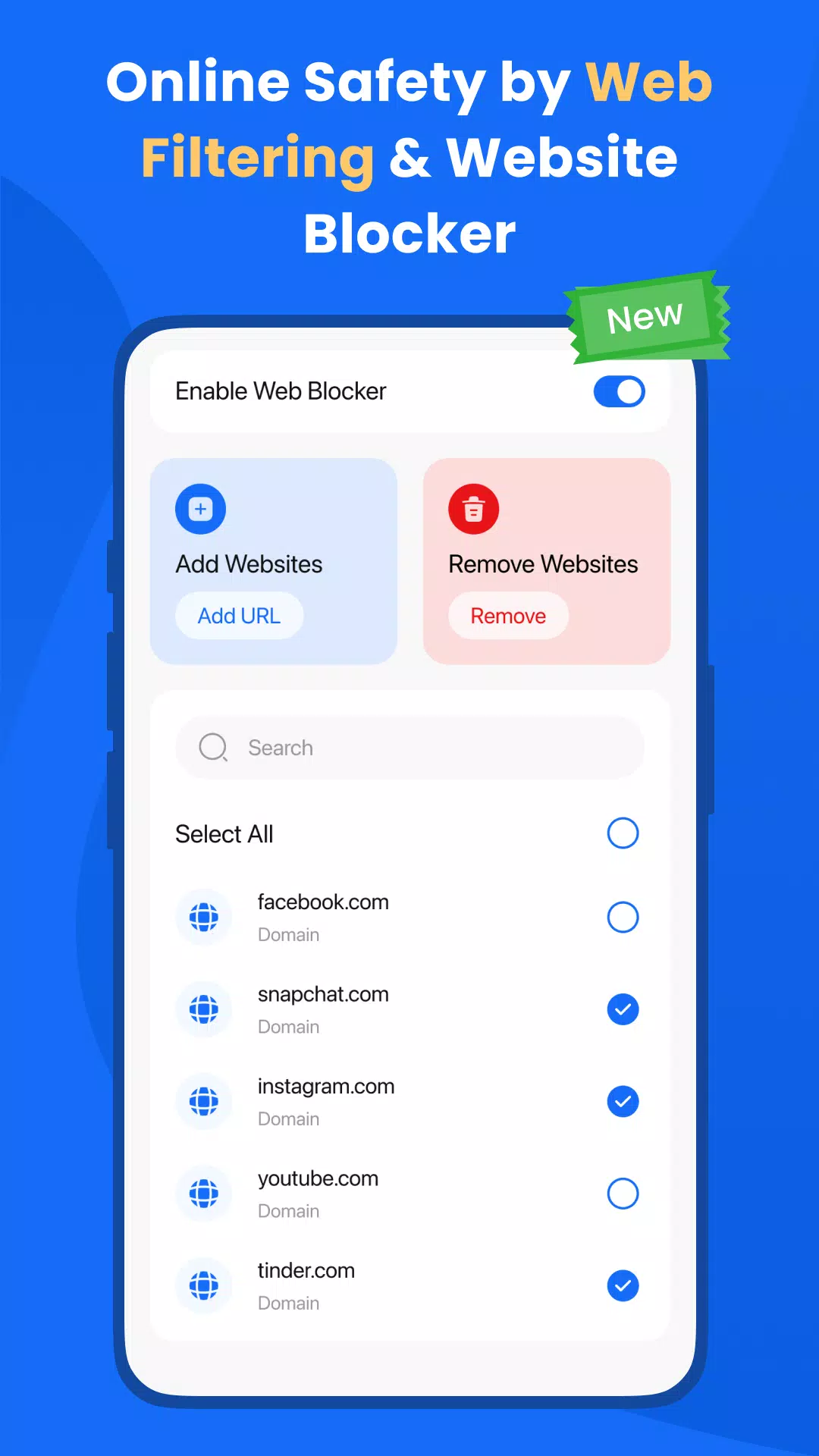
- Web Blocker: Create a block list to prevent access to unwanted websites, ensuring your child's digital safety.
- FamilyPause: Instantly lock your child's device to encourage disconnection from screens when necessary.
- Web Filtering: Block inappropriate content and enforce safe searches on engines like Google and Bing, protecting your child from harmful material.
- Approve Apps: Gain control over the apps installed on your child's phone by approving or rejecting them.
A Parental Monitoring App:
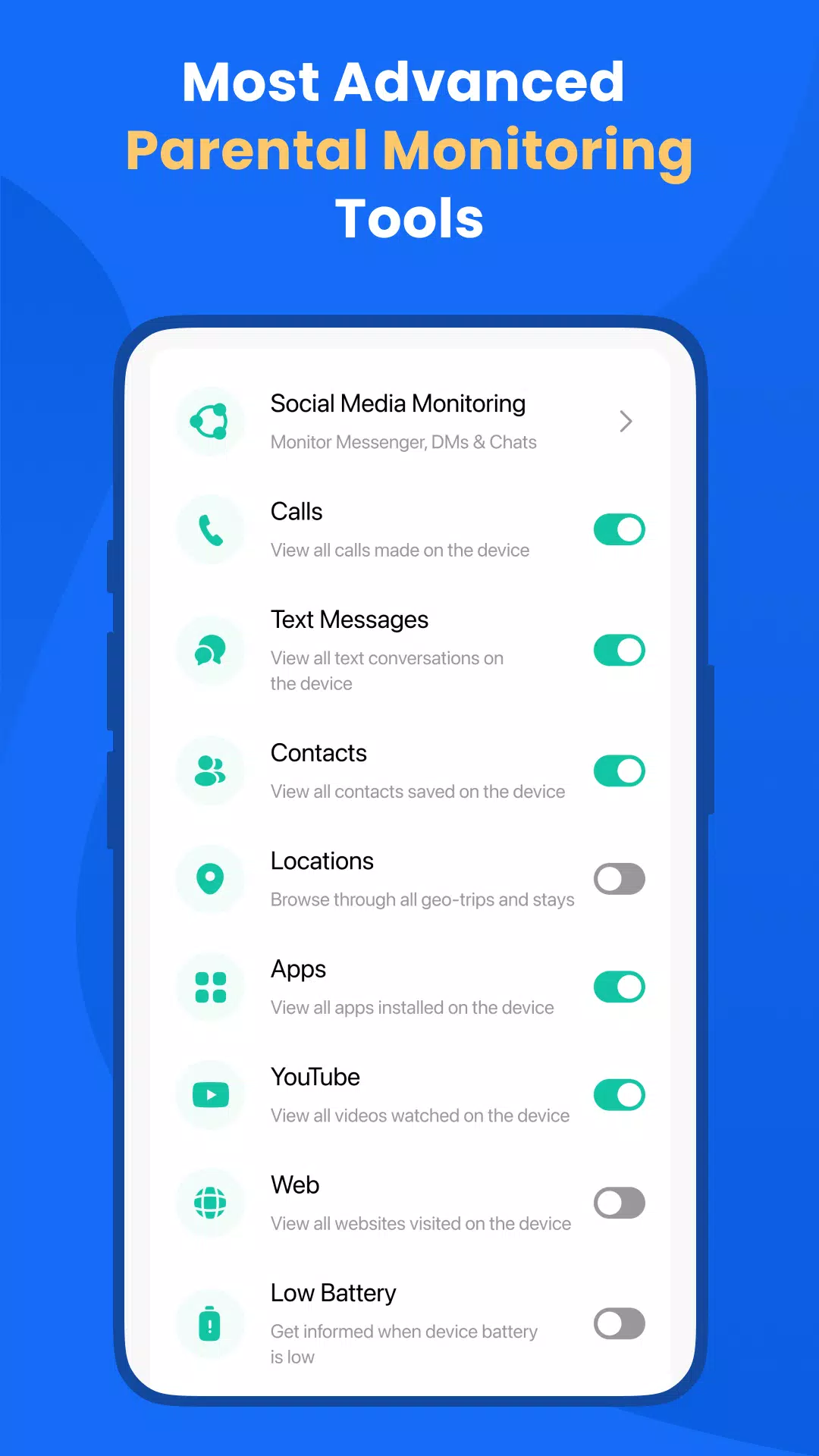
FamilyTime goes beyond control with robust monitoring features:
- Family Locator and GPS Tracker: Integrated into the app, the Family Locator provides real-time location updates of your child, ensuring you always know where they are.
- Social Media Monitoring: Stay informed about your child's social media activity to address potential issues like cyberbullying or inappropriate content.
- Call and SMS Monitoring: Keep track of your child's communications for added peace of mind.
- Geofencing: Set up virtual boundaries and receive alerts when your child enters or exits these areas.
- SOS/Panic Button: Equip your child with an emergency button to quickly alert you or other trusted contacts in case of an emergency.
Why FamilyTime is the Best Parental Control App:
- 30-day reporting history for comprehensive insights into your child's digital activity.
- Priority live support to assist you whenever you need help.
- Invite another guardian to supervise for free, ensuring collaborative parenting.
- Free access to new features to keep your app up-to-date.
- Link more devices for full family mode, managing multiple children's devices seamlessly.
- Privacy protection and GDPR compliance to safeguard your family's data.
- Data security and safety with end-to-end encryption for peace of mind.
Download the FamilyTime Parental Control App on your Android device and the FamilyTime Jr. app on your child's device(s) to start managing their screen time across platforms.
FAQ:
- Is there any fee for installing FamilyTime App on a parent device? No, it's free for all parent devices. You can install it on multiple devices at no cost!
- Which OS does the app work on? FamilyTime supports Android 8 or higher.
- What languages do you support? The app is available in English, Spanish, French, Italian, Portuguese, German, Japanese, Turkish, Finnish, Arabic, and Chinese.
Try it for Free
Start with a 3-day free trial after a minimal fee for an annual subscription.
Note:
We prioritize your privacy. Please review our:
➠ Privacy Policy at https://familytime.io/legal/privacy-policy.html
➠ Terms and Conditions at https://familytime.io/legal/terms-conditions.html













-
Arc Raiders Dev to End Support of The Finals' PS4 Version to Focus 'Our Support on Current Generation Hardware'
Embark Studios — the creative force behind the blockbuster hit Arc Raiders — has announced it will discontinue last-generation support for The Finals next year.Although Season 10 is scheduled to launch as planned across all other platforms on March
Sep 20,2026 -
High on Life 2 Coming to PC, PS5, Xbox & Game Pass
Squanch Games has revealed High on Life 2 during Xbox Games Showcase 2025, confirming a winter release for PC, PlayStation 5, and Xbox Series X/S, including Game Pass availability.Return to the Absurd First-Person Shooter UniverseThe sequel continues
Sep 20,2026 - ◇ Xbox Showcase 2025 Reveals 3v3 Fighter Sep 16,2026
- ◇ Disney Solitaire MAC Edition: Essential Guide Sep 15,2026
- ◇ Spirit Empress Debuts in Clash Royale with 4 Events Sep 14,2026
- ◇ Divinity Original Sin 3 Rumors Debunked As Fans Tie TGA Statue to New Logo Sep 13,2026
- ◇ Cute Auto-Chess Game Claws & Chaos Now Available Sep 11,2026
- ◇ Arknights Mizuki & Caerula Another Tides – Mode Overview, Mechanics, and Gameplay Breakdown Sep 10,2026
- ◇ Pokémon Go unveils the Delightful Days season, which will run throughout the summer Sep 09,2026
- ◇ Ex-Subnautica 2 Leads Accuse Krafton of Blocking Release, Sacking to Dodge Bonus Sep 08,2026
- ◇ Best Buy Has the Lowest Price I've Seen on a QD-OLED Gaming Monitor Sep 08,2026
- ◇ Steve's Lava Chicken: Shortest Song to Hit UK Chart Sep 07,2026




- 1 Roblox: Eat Pizza to Grow GIGACHAD Codes (January 2025) Feb 25,2025
- 2 All the Buttons on Fisch Can Be Found Here Dec 24,2024
- 3 Hogwarts Mystery Character Guide - All Romance Options Explained Apr 07,2025
- 4 Three Nights at the Blacksite Pressure Guide [April Fools] May 12,2025
- 5 Roblox Forsaken Characters Tier List 2025 Feb 14,2025
- 6 Top Pirate Crew Formations: Like a Dragon: Hawaii Mar 13,2025
- 7 Marvel Rivals' Controversial Hitbox System Draws Attention Feb 11,2025
- 8 Marvel Contest of Champions Champion Cards Guide Mar 14,2025





-
Mastering the Art of Digital Tools
A total of 10
-
Best News & Magazines Apps for Daily Reading
A total of 10
-
Hidden Gems: Unexpectedly Useful Other Apps
A total of 10











