

Image To Video Movie Maker
- Video Players & Editors
- 3.2
- 96.60M
- by Slideshow Solution
- Android 5.1 or later
- Nov 05,2021
- Package Name: com.slideshowsolution.imagetovideomoviemaker
Introducing Image To Video Movie Maker, the Ultimate Photo Slideshow Maker with Music
Say goodbye to complicated editing processes and hello to a streamlined interface that elevates your slideshow creation. Image To Video Movie Maker stands out from the crowd with its unique features and robust toolkit, making it the ultimate tool for crafting captivating photo slideshows with music.
Customize Your Photos with Ease:
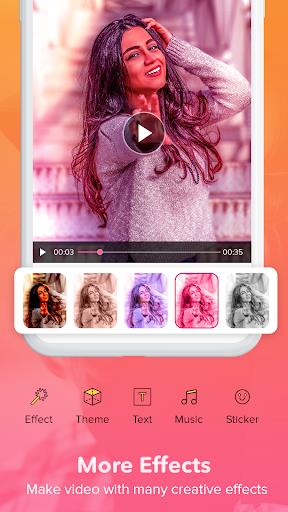
- Comprehensive Editing Tools: Edit each photo individually with a range of tools, including filters, effects, brightness adjustments, resizing, rotating, stickers, and text.
- Rearrange, Apply Filters, and More: Rearrange your photos to your liking, apply filters to enhance their look, and add your personal touch with stickers and text.
Enhance Your Slideshow with Music and More:
- Background Music: Set the mood with your favorite music tracks.
- Frames and Themes: Choose from a selection of frames and themes to give your slideshow a unique style.
- Preview Your Masterpiece: Use the instant preview feature to see how your slideshow looks with different themes and frames before finalizing it.
Share Your Creation with the World:
- Effortless Sharing: Share your stunning photo slideshows on social media or as a story with ease.
Features of Image To Video Movie Maker:
- Next Level Photo Slideshow Experience: Image To Video Movie Maker takes your photo slideshow experience to the next level with its unique features and tools.
- DNA & CORE Features: Unlike other movie maker and slideshow maker applications, Image To Video Movie Maker offers special DNA and CORE features that set it apart from the rest.
- In-App Editing Tool: Image To Video Movie Maker provides an intuitive and user-friendly editing tool that allows you to edit each photo separately, offering a seamless editing experience.
- Various Editing Tools: Image To Video Movie Maker offers a range of editing tools such as filters, effects, background changes, brightness control, resizing, rotating, stickers, and text adding.
Tips for Users:
- Re-Arrange Photos: Make your slideshow truly yours by re-arranging the photos in your own desired sequence.
- Add Your Favorite Music: Enhance your slideshow by adding your favorite music track in the background. You can also trim the special part of the song if you like.
- Control Slideshow Duration: Have full control over the duration of your slideshow by setting the proper sliding images one by one.
- Instant Preview: Before finalizing your slideshow, take advantage of the instant preview feature that allows you to see how your slideshow looks with different themes and frames.
Conclusion:
With Image To Video Movie Maker, creating your own photo slideshow movie with music has never been easier. The app offers a range of unique features and tools that take your photo slideshow experience to the next level. Its intuitive in-app editing tool allows you to edit each photo separately, while various editing tools give you the freedom to customize your slideshow to your liking. With the ability to re-arrange photos, add favorite music, control slideshow duration, and preview different themes and frames, Image To Video Movie Maker provides a comprehensive and user-friendly experience for creating stunning photo slideshows. Download it now and unleash your creativity!



-
Premoment Mod

-
Live Mobile Video Chat

-
Tube Offline Video Player HD

-
Radio ESKA2

-
Music Player - MP3 Player

-
Pora Live & Video Call

-
CTMHomeMedia

-
Sing King: The Home of Karaoke

-
القرآن بدون نت للشيخ السديس

-
Gallery Vault-Hide Photo Video

-
Animeflv Watch Anime Online

-
Portland Police Scanner Free Police Scanner App

-
Filmyhit - Filmyhit Movies

-
Roja directa - Live Soccer

-
Hideo Kojima 'Already Wrote the Concept' for Death Stranding 3, But Isn't Making It Right Now
Death Stranding 2: On the Beach, the sequel to Hideo Kojima's 2019 hit Death Stranding, was well-received at launch. It's "incredibly exciting and original," and "bold work that deserves to be encouraged," at least, according to our review. As a resu
Sep 25,2026 -
 The Outer Worlds 2 News
The Outer Worlds 2 News2025June 30⚫︎ The Outer Worlds 2 draws heavy inspiration from Obsidian Entertainment’s acclaimed title, Fallout: New Vegas. Additionally, Game Director Brandon Adler confirmed that the Deus Ex series also influenced the game, s
Sep 25,2026 - ◇ Dune: Awakening's Rentable Private Servers Available at Launch — Here's What You Do (And Don't) Get Sep 22,2026
- ◇ Infinity Nikki Version 1.8 Danqing Season Unveils Mythical Art Adventure Sep 22,2026
- ◇ Arc Raiders Dev to End Support of The Finals' PS4 Version to Focus 'Our Support on Current Generation Hardware' Sep 20,2026
- ◇ High on Life 2 Coming to PC, PS5, Xbox & Game Pass Sep 20,2026
- ◇ Xbox Showcase 2025 Reveals 3v3 Fighter Sep 16,2026
- ◇ Disney Solitaire MAC Edition: Essential Guide Sep 15,2026
- ◇ Spirit Empress Debuts in Clash Royale with 4 Events Sep 14,2026
- ◇ Divinity Original Sin 3 Rumors Debunked As Fans Tie TGA Statue to New Logo Sep 13,2026
- ◇ Cute Auto-Chess Game Claws & Chaos Now Available Sep 11,2026
- ◇ Arknights Mizuki & Caerula Another Tides – Mode Overview, Mechanics, and Gameplay Breakdown Sep 10,2026




- 1 All the Buttons on Fisch Can Be Found Here Dec 24,2024
- 2 Roblox: Eat Pizza to Grow GIGACHAD Codes (January 2025) Feb 25,2025
- 3 Hogwarts Mystery Character Guide - All Romance Options Explained Apr 07,2025
- 4 Three Nights at the Blacksite Pressure Guide [April Fools] May 12,2025
- 5 Roblox Forsaken Characters Tier List 2025 Feb 14,2025
- 6 Top Pirate Crew Formations: Like a Dragon: Hawaii Mar 13,2025
- 7 Marvel Rivals' Controversial Hitbox System Draws Attention Feb 11,2025
- 8 Marvel Contest of Champions Champion Cards Guide Mar 14,2025





-
Mastering the Art of Digital Tools
A total of 10
-
Best News & Magazines Apps for Daily Reading
A total of 10
-
Hidden Gems: Unexpectedly Useful Other Apps
A total of 10











